
Artificial intelligence is no longer a futuristic concept. In 2026, AI assistants have become essential tools for students, professionals, entrepreneurs, content creators, marketers, and business owners.
Yet after testing hundreds of prompts and observing how people interact with AI, I’ve noticed one surprising pattern: most users only unlock about 20% of ChatGPT’s real potential.
Many people ask simple questions and accept the first answer. Professionals, however, use strategic prompting techniques, workflow automation, and context engineering to transform ChatGPT into a research assistant, productivity partner, brainstorming expert, coding helper, and business consultant.
If you’ve ever wondered why some people get incredible results while others receive generic responses, this guide is for you.
In this article, you’ll learn how to use ChatGPT like a pro, discover hidden ChatGPT tips and tricks, explore practical prompts, and master advanced ChatGPT techniques that can save hours every week.
Table of Contents
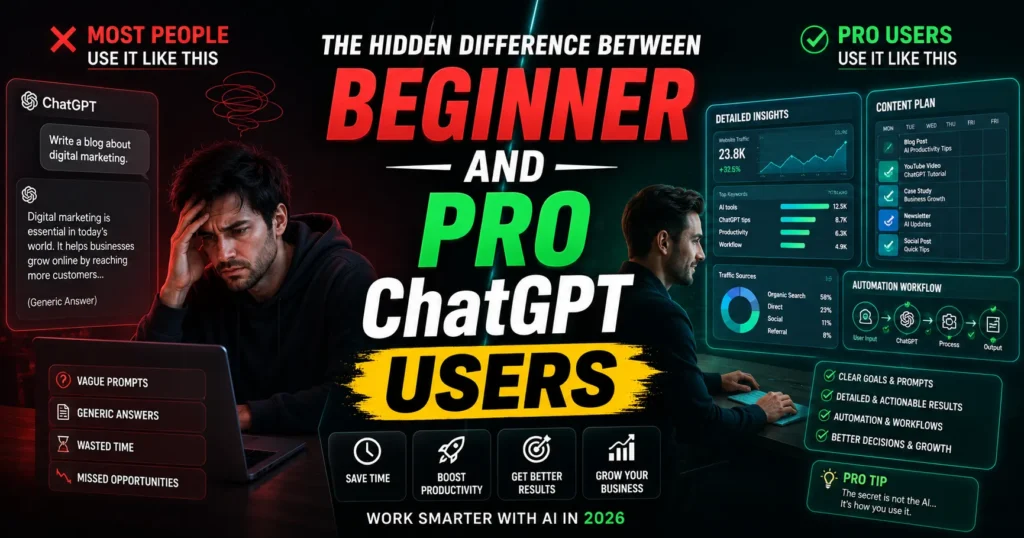
Why Most People Use ChatGPT Wrong
Most users type questions like:
“Write a blog post about AI.”
The result?
A generic article that sounds similar to thousands of others.
Professional users understand that ChatGPT performs best when given:
- Clear instructions
- Context
- Specific goals
- Audience information
- Output formatting requirements
Think of ChatGPT like a highly intelligent employee. The better your instructions, the better the outcome.
| Sr.# | Description | Download |
|---|---|---|
| 1 | IT Support Commands Quick Reference Checklist | IT Support Commands Quick Reference Checklist |
| Sr.# | Description | Download |
|---|---|---|
| 1 | Rufus Make Bootable USB Media | Rufus Make Bootable USB Media |
| 2 | Building a Virtual Lab with Active Directory Windows Server 2025 | Building a Virtual Lab with Active Directory Windows Server 2025 |
| 3 | ||
What Makes a Professional ChatGPT User?
Professional users don’t simply ask questions.
They build systems.
Whether they’re creating content, managing digital marketing campaigns, analyzing cybersecurity trends, researching cloud computing platforms, comparing SaaS tools, or developing automation software, they use AI strategically.
The difference comes down to prompt quality and workflow design.
10 Powerful Tips to Use ChatGPT Like a Pro
1. Assign a Role Before Every Prompt
One of the best ChatGPT tips and tricks is assigning a role.
Instead of:
“Write a marketing plan.”
Use:
Act as a senior digital marketing strategist with 15 years of experience. Create a 90-day marketing plan for a new SaaS startup targeting small businesses.
Result:
More focused, professional, and relevant output.
2. Give Context First
Context dramatically improves response quality.
Weak Prompt
Explain VPN services.
Better Prompt
Explain VPN services to a small business owner concerned about cybersecurity, remote employees, and online privacy.
ChatGPT now understands:
- Audience
- Purpose
- Knowledge level
This is one of the fastest ways to learn how to get better answers from ChatGPT.
3. Define the Exact Output Format
Don’t let ChatGPT guess.
Tell it exactly what you want.
Examples:
- Table
- Checklist
- Comparison chart
- Step-by-step guide
- Executive summary
- Social media thread
- YouTube script
Example Prompt
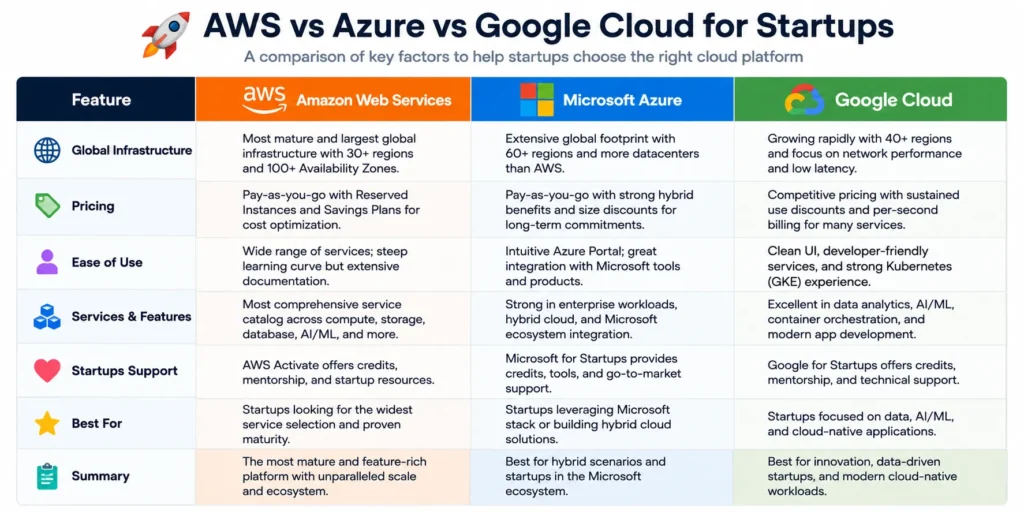
Create a comparison table between AWS, Azure, and Google Cloud for startups.
The response becomes immediately usable.
4. Use Chain Prompting
Professional users rarely stop after one prompt.
They build conversations.
Example Workflow
Prompt 1:
Give me 20 business ideas using AI.
Prompt 2:
Rank them by startup cost.
Prompt 3:
Create a business model for the top idea.
Prompt 4:
Generate a landing page copy.
This technique produces significantly better results than asking everything at once.
5. Ask ChatGPT to Think Step-by-Step
Complex questions benefit from structured reasoning.
Example Prompt
Analyze this business idea step-by-step. Evaluate market demand, competition, monetization potential, risks, and scalability.
The output becomes more detailed and strategic.
6. Build Reusable Prompt Templates
One of the most effective ChatGPT productivity hacks is creating templates.
Content Creation Template
Act as a technology journalist. Write an SEO-friendly article targeting Google Discover. Include data, expert insights, FAQs, and practical examples.
Marketing Template
Create a conversion-focused email campaign for [PRODUCT].
Save these prompts and reuse them.
7. Use ChatGPT for Research, Not Just Writing
Many users only generate content.
Professionals use ChatGPT to:
- Research trends
- Analyze competitors
- Summarize reports
- Explore market opportunities
- Identify SaaS tools for business growth
- Evaluate automation software
This can cut research time dramatically.
8. Turn ChatGPT Into a Personal Consultant
This is where advanced ChatGPT techniques become powerful.
Examples:
Business Consultant
Analyze my business model and identify weaknesses.
SEO Consultant
Audit my content strategy and suggest improvements.
Productivity Coach
Review my daily routine and optimize it.
The more information you provide, the better the recommendations.
9. Use Follow-Up Prompts Aggressively
Most people accept the first answer.
Pros refine.
Try:
- “Make it more detailed.”
- “Add examples.”
- “Simplify for beginners.”
- “Improve readability.”
- “Rewrite in a professional tone.”
Each refinement improves output quality.
10. Create Entire Workflows With ChatGPT
The biggest productivity gains happen when ChatGPT becomes part of a system.
Examples:
Content Marketing Workflow
Research → Outline → Draft → SEO Optimization → Social Posts
Business Workflow
Idea Validation → Market Analysis → Sales Copy → Customer Support Scripts
YouTube Workflow
Topic Research → Script → Thumbnail Ideas → Title Variations → Description
This is how power users save hours every week.
ChatGPT Prompt Examples with Outputs
Example 1: Blog Writing
Input Prompt
Act as a technology journalist. Explain how AI is changing digital marketing in 2026.
Sample Output
“Artificial intelligence is transforming digital marketing through predictive analytics, automated content generation, customer segmentation, and personalized advertising. Businesses are increasingly using AI-powered tools to improve campaign performance while reducing operational costs.”
Example 2: Business Automation
Input Prompt
Suggest AI tools for automating customer support in a small eCommerce business.
Sample Output
| Tool | Use Case |
|---|---|
| ChatGPT | Customer support responses |
| Zendesk AI | Ticket management |
| Intercom AI | Live chat automation |
| HubSpot AI | CRM automation |
| Freshdesk AI | Customer service workflows |
Example 3: SEO Content
Input Prompt
Generate 10 SEO blog ideas about cloud computing for beginners.
Sample Output
- What Is Cloud Computing?
- AWS vs Azure Comparison
- Cloud Security Best Practices
- Cloud Storage Explained
- Multi-Cloud Strategies
- Benefits of Cloud Hosting
- Hybrid Cloud Guide
- Cloud Migration Tips
- Enterprise Cloud Solutions
- Future of Cloud Computing
Beginner vs Pro ChatGPT User
| Beginner User | Professional User |
|---|---|
| One prompt | Multi-step workflow |
| Generic questions | Specific instructions |
| Accepts first answer | Iterates repeatedly |
| No context | Detailed context |
| Basic outputs | Strategic outputs |
| Uses AI occasionally | Uses AI daily |
Productivity Impact Breakdown
Based on industry adoption trends in 2025–2026, AI-powered workflows are increasingly helping professionals save significant time.
| Task | Traditional Time | With ChatGPT |
|---|---|---|
| Blog Outline | 60 Minutes | 5 Minutes |
| Research Summary | 2 Hours | 15 Minutes |
| Marketing Email | 45 Minutes | 5 Minutes |
| Social Media Plan | 3 Hours | 20 Minutes |
| Brainstorming Session | 90 Minutes | 10 Minutes |
The productivity gains are why businesses are investing heavily in AI tools, cloud platforms, and automation systems.
Expert-Level ChatGPT Strategies
Once you’ve mastered the basics, try these advanced workflows:
Content Strategy Planning
Generate:
- Keyword clusters
- Topic maps
- Internal linking suggestions
- Discover-friendly headlines
Business Growth
Use ChatGPT to analyze:
- Monetization opportunities
- SaaS adoption
- Customer acquisition strategies
- Enterprise software solutions
Cybersecurity Awareness
Ask ChatGPT to explain:
- Data privacy tools
- VPN services
- Security best practices
- Online threat protection
Developer Productivity
Use it alongside resources from:
to accelerate development and learning.
Common Mistakes People Make
Being Too Vague
Bad:
Write about technology.
Good:
Write a beginner-friendly article explaining how AI automation impacts small businesses in 2026.
Ignoring Context
Context is often the biggest factor affecting quality.
Not Refining Responses
The first answer is usually a starting point, not the final version.
Expecting Perfect Accuracy
Always verify:
- Statistics
- Financial information
- Medical advice
- Legal recommendations
Using One Massive Prompt
Break large tasks into smaller steps for better results.
Final Thoughts
Learning how to use ChatGPT effectively is quickly becoming a valuable digital skill.
As AI becomes integrated into business operations, digital marketing, content creation, cloud computing, cybersecurity, and online monetization systems, the people who understand prompt engineering and AI workflows will have a significant advantage.
The biggest takeaway isn’t that ChatGPT is powerful.
It’s that most people still use it like a search box.
The professionals who get extraordinary results treat it like a skilled collaborator.
Master the techniques above, and you’ll quickly move from beginner-level prompts to expert-level AI productivity.
FAQs
How do I get better answers from ChatGPT?
Provide clear instructions, context, audience details, and output requirements. Specific prompts consistently generate better responses.
What are the best ChatGPT prompts for beginners?
Role-based prompts work best. For example:
Act as a teacher and explain cloud computing to a beginner.
Can ChatGPT help make money online?
Yes. Many people use ChatGPT for content creation, digital marketing, freelancing, SEO, business planning, and automation workflows.
What are the best ChatGPT productivity hacks?
Creating reusable prompt templates, using follow-up prompts, and building AI-powered workflows are among the most effective productivity strategies.
Are advanced ChatGPT techniques difficult to learn?
No. Most advanced techniques involve better prompting, structured instructions, and iterative conversations rather than technical skills.
Can ChatGPT replace Google Search?
Not completely. ChatGPT is excellent for explanations and content generation, while search engines remain important for real-time information and source verification.

Israr Ahmed Technology educator and IT professional specializing in networking, cybersecurity, software solutions, and digital systems. Founder of DriveInTech, delivering practical tutorials, AI tools, SEO strategies, and real-world digital solutions.